
User testers explained: Unlock user insights for better UX
TL;DR:
- User testers are external participants who simulate real customer interactions, unlike internal QA teams.
- They provide qualitative insights into usability issues, helping to refine products before launch.
- Combining user testing with analytics enables faster, more informed product improvements and higher conversion rates.
Marketers and product managers often assume that user testing is just another name for what their QA team already does. It is not. A user tester is a real person, outside your company, interacting with your product in ways that mirror how your actual customers behave. That distinction is massive, because internal testers know too much. They know where buttons are supposed to go, what the copy is trying to say, and how the flow was intended to work. Real users do not. This guide will show you exactly who user testers are, how to work with them, and how their feedback can power smarter A/B testing and stronger user experiences.
Table of Contents
- What is a user tester?
- Common types of user testing (and where user testers fit)
- How marketers and product managers recruit and use user testers
- What happens during and after a user test?
- A modern perspective: Why user testers are marketers' secret weapon
- Ready to power up your product with real user feedback?
- Frequently asked questions
Key Takeaways
| Point | Details |
|---|---|
| User testers defined | User testers are recruited participants providing real feedback to improve products. |
| Broader than QA | User testers represent real customers, not internal QA; their feedback drives better UX. |
| Methodology matters | Choosing the right user testing type (moderated, unmoderated, exploratory, or task-based) determines insight quality. |
| Easy recruiting | Marketers can access vast pools of user testers using platforms like uTest and UserTesting. |
| Actionable insights | Combining user tester input and analytics leads to more effective A/B testing and product improvement. |
What is a user tester?
Now that you know the importance of user testing in marketing, let us clarify who user testers actually are.
A user tester is a recruited individual, typically someone outside your organization, who interacts with your product, website, or prototype under controlled or semi-controlled conditions. According to research from Yale's usability program, user testers are real participants observed during tests to identify usability issues and validate design decisions. They are not developers hunting for bugs. They are not colleagues offering opinions in a Slack thread. They are representative members of your target audience, doing real tasks, and surfacing friction you never knew existed.
This distinction shapes everything. A QA tester verifies that your product works as coded. A beta tester checks if features hold up in live environments. A user tester tells you whether your product actually makes sense to the people who need it. Those are three very different jobs.
User testing sessions can be moderated or unmoderated. In moderated sessions, a facilitator guides the user tester through tasks in real time, asking follow-up questions and probing for reasoning. In unmoderated sessions, testers work independently through a set of tasks, and their screens, clicks, and verbal reactions are recorded for later review. Both approaches have real value. Moderated sessions are richer and more nuanced. Unmoderated sessions scale faster and cost less.
Here is how the three tester roles compare:
| Role | Who they are | What they test | When they're used |
|---|---|---|---|
| User tester | External, recruited participant | Real-world usability and experience | Discovery, design, and post-launch |
| QA tester | Internal engineer or specialist | Code functionality and bug detection | Pre-launch and during development |
| Beta tester | Early adopters or selected users | Feature stability in live environments | Late-stage development and rollout |
User testers play a particularly powerful role in landing page conversions because they catch messaging gaps, confusing layouts, and friction points before you spend budget driving traffic to a broken experience.
Key things user testers help you understand:
- Whether users can complete core tasks without assistance
- Where they get confused, frustrated, or drop off
- What language and framing resonates with them
- Whether your calls to action are clear and motivating
- How your product compares to their existing mental models
Common types of user testing (and where user testers fit)
Understanding what a user tester is, let us explore the main types of user testing and where these participants truly make a difference.
User testing is not a single activity. It covers a range of methodologies, and user testing covers exploratory and task-based methodologies with meaningful differences in how user testers are involved. Choosing the wrong type for your current stage is one of the most common mistakes teams make.
Exploratory testing happens early, when you are still defining the problem. You bring in user testers with minimal structure, ask open-ended questions, and watch how they naturally navigate your product or prototype. The goal is to discover problems you have not thought to ask about yet. This is where you uncover the surprising stuff.
Task-based testing is more structured. You give user testers a specific scenario and ask them to complete a goal, like "find a pricing plan that fits a team of five" or "check out using a promo code." You observe where they succeed and where they fail. This approach connects directly to A/B testing because task completion rates become measurable signals for which variant actually works.
Here is a side-by-side comparison of moderated and unmoderated testing:
| Factor | Moderated | Unmoderated |
|---|---|---|
| Cost | Higher | Lower |
| Depth of insight | Rich, nuanced | Surface to moderate |
| Speed | Slower | Faster |
| Sample size | Small (5 to 10) | Larger (20 to 50+) |
| Flexibility | High (follow-up questions) | Limited |
| Best for | Early discovery, complex flows | Validating known issues at scale |
When should you bring in user testers? Here is a practical sequence:
- Before design starts to understand real user mental models and language
- During wireframing to catch navigation and layout problems early
- During prototype testing to validate flows before any code is written
- After launch to confirm that live traffic behaves as expected
Informing effective landing page design with user tester feedback at the wireframe stage, for example, can prevent expensive redesigns after a campaign has already launched.
Pro Tip: Combine qualitative data from moderated sessions with quantitative data from unmoderated sessions. Qualitative feedback tells you the "why" behind a behavior. Quantitative patterns tell you how widespread that behavior is. Together, they give you the confidence to make real product decisions instead of guessing.
How marketers and product managers recruit and use user testers
With an understanding of the testing approaches, here is how marketers and PMs actually connect with user testers.
Finding the right user testers is arguably more important than the test design itself. A test with the wrong participants produces insights that lead you in the wrong direction. Platforms like UserTesting and uTest provide access to a panel of real user testers for digital product feedback, spanning demographics, device types, and industries. These platforms make it straightforward to filter participants by criteria like age, job title, device usage, and purchase behavior.
For B2C products, consumer panels on platforms like UserTesting, Lookback, or Maze work well. You can recruit dozens of participants in hours. For B2B products, the pool narrows significantly. You often need to recruit through LinkedIn outreach, customer advisory boards, or specialized professional panels. Budget more time and offer more compelling incentives for B2B sessions.
Incentives matter more than most teams think. Here are the most effective options:
- Cash or PayPal payments work universally and tend to attract motivated testers
- Gift cards (Amazon, Visa, retail) are a strong alternative for consumer audiences
- Early product access appeals to enthusiastic users who want to influence your roadmap
- Charitable donations in the tester's name work well for mission-driven audiences
- Discounts or premium upgrades for existing customers who join your test panel
For reference, unmoderated remote tests typically pay $10 to $20 per session. Moderated one-on-one sessions with a niche professional audience can go from $75 to $200 per hour. Budget accordingly based on your audience's scarcity and the session length.
Many marketers also explore beta and user testing platforms specifically designed for small to medium-sized businesses, where costs are structured to match leaner budgets without sacrificing participant quality.
Pro Tip: Before any session starts, screen your user testers with two to three qualification questions. Ask about their current tools, their role, or a recent purchase. This quick step filters out participants who rushed through the screener just to get the incentive, protecting the integrity of your data.
Key sourcing considerations by product type:
- B2C products: Consumer panels, social media recruiting, email lists
- B2B SaaS: LinkedIn targeting, partner networks, professional communities, existing customer panels
- Niche verticals: Industry forums, trade publications, specialized agencies
What happens during and after a user test?
Once you have set up a test and recruited user testers, here is what actually happens and why proper analysis matters.

A well-run user testing session follows a predictable structure, and that structure exists for a reason. When you stay consistent, your data is easier to compare across sessions and participants.
Here is the typical flow of a user testing session:
- Intro and consent: The facilitator (or recorded instructions in unmoderated tests) explains the purpose, confirms recording consent, and sets expectations. Testers are reminded that you are testing the product, not them.
- Warm-up questions: Light questions about the tester's habits, background, or context. This establishes rapport and ensures the tester is in the right headspace.
- Task scenarios: Testers receive specific, realistic scenarios. Tasks are written in plain language and never hint at where to click or what to do.
- Think-aloud protocol: Testers verbalize their thoughts as they work through tasks. This is the gold of user testing. You hear confusion, assumptions, and frustration in real time.
- Post-task questions: After each task, you ask how difficult it felt and what the tester expected to happen. Short Likert scales (1 to 5 difficulty ratings) create quantifiable data points.
- Debrief: A short open-ended conversation after all tasks. Testers share overall impressions and anything the structured tasks did not surface.
After sessions wrap, synthesis is where most teams either succeed or stall. The Nielsen Norman Group advises that teams should carefully synthesize behavioral and attitudinal data, filtering findings for authenticity, consistency, and relevance before drawing conclusions.
"Not all feedback is created equal. Prioritize observations that are consistent across multiple testers and supported by behavioral evidence, not just stated preferences." — Nielsen Norman Group
The synthesis process involves tagging observations from each session, clustering them into patterns, and ranking issues by frequency and severity. A single tester struggling with your checkout button is interesting. Five out of eight testers struggling with it is a finding you act on immediately.
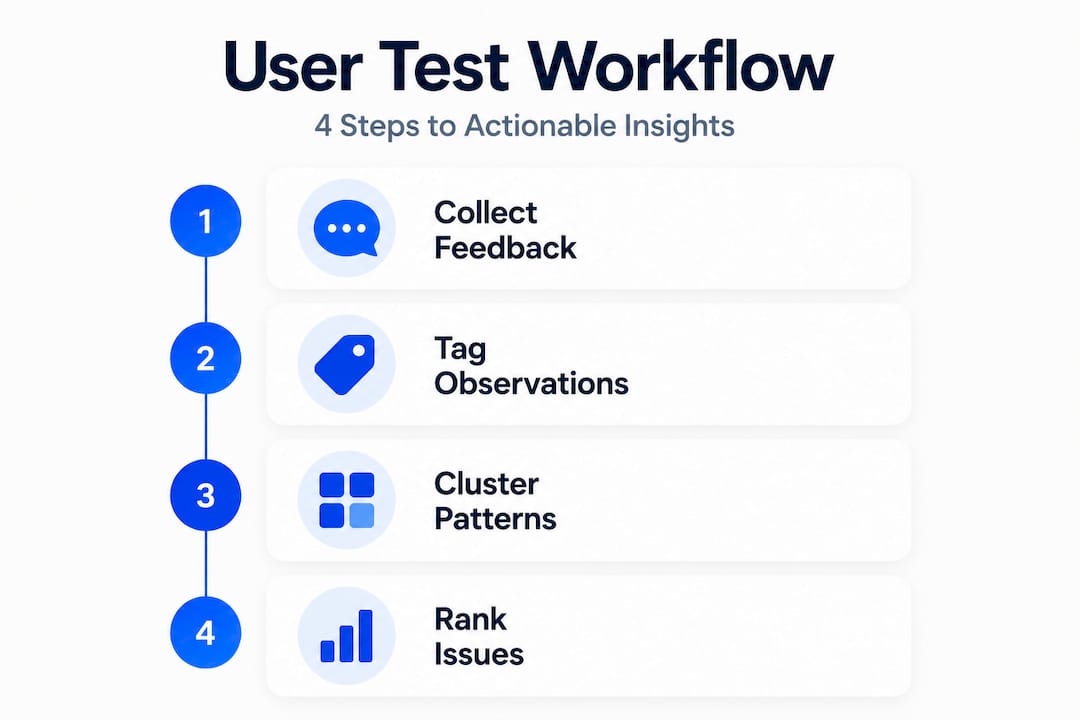
Once you have ranked issues, connect them to quick landing page optimization opportunities. Some findings point to small copy changes. Others reveal structural navigation problems that need A/B test validation before you commit to a redesign.
A modern perspective: Why user testers are marketers' secret weapon
Here is an uncomfortable truth most marketing teams are slow to accept. Analytics dashboards are brilliant at telling you what is happening. They will show you that 60% of users drop off at your pricing page, that bounce rates spike on mobile, or that one CTA button outperforms another. What they absolutely cannot tell you is why any of that is happening.
That "why" is where user testers live. And it is the gap between teams that iterate slowly, making educated guesses based on traffic data, and teams that move fast with actual conviction because they have watched real people struggle or succeed.
We have seen marketers at small and mid-sized businesses assume that improving landing page performance is purely an A/B testing game. Run enough tests, collect enough data, and the numbers will tell you what to fix. That logic is partially right but fundamentally incomplete. A/B testing confirms which variant wins. User testers tell you what variants are worth building in the first place.
The brands that adopted user-centric iteration early did not just build better products. They built faster. When your design decisions are grounded in real user behavior, you waste less time on variants that sound good in theory but fail with actual users. Your A/B testing ideas become sharper because they come from observed friction, not internal brainstorming sessions.
The practical lesson is this: treat user testers as a source of hypotheses, not just validation. Run a round of user testing, extract the friction points, turn them into A/B test variants, and let your live traffic confirm which fix works at scale. That loop, qualitative insight feeding quantitative testing, is the most efficient growth process available to a small marketing team with limited engineering resources.
Ready to power up your product with real user feedback?
User testing gives you the raw material. What you do with those insights determines whether they move the needle on your conversion rates, retention, and overall product experience.

If you are ready to turn user tester observations into winning experiments, Stellar makes that next step fast and friction-free. Our platform was built specifically for marketers and product managers at small to medium-sized businesses who need to run rigorous A/B testing for landing pages without waiting on developers. With a no-code visual editor, real-time analytics, and a lightweight 5.4KB script that does not slow your site, you can launch your first test in minutes. Explore what's possible at Stellar and start validating your user testing insights with real traffic today.
Frequently asked questions
How is a user tester chosen?
User testers are selected for relevance to your product and test objectives, typically through screener surveys that match participants to your target audience profile.
What's the difference between a user tester and a usability tester?
A usability tester focuses on ease of use during defined tasks, while a user tester may provide broader feedback across different stages and goals of the product experience.
Do I need user testers if I already use analytics tools?
Yes. Analytics show what users do, but behavioral and attitudinal data from user testers reveal why they struggled or succeeded, which is the information you need to fix the right problems.
Are there affordable platforms for finding user testers?
uTest and similar platforms offer scalable, cost-effective options for recruiting user testers across a wide range of product types and audience segments.
Recommended
Published: 4/29/2026