
User testing methods that boost website performance
TL;DR:
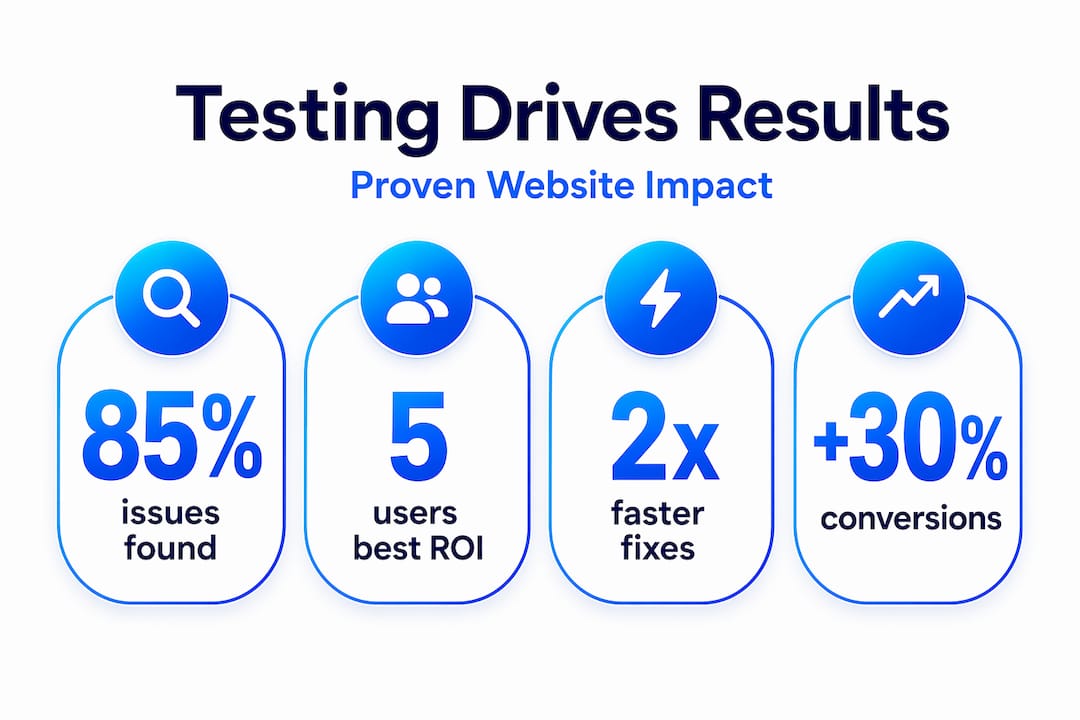
- User testing is an affordable and effective method for small and medium-sized businesses to uncover website issues by observing real users completing realistic tasks. It emphasizes that just five users can reveal 85% of critical problems, providing actionable insights through focused, low-cost sessions like remote moderated tests. Regular, structured testing helps SMBs continuously improve conversions and user experience, leveraging simple tools and a mindset of data-driven decision-making.
User testing sounds like something reserved for Silicon Valley teams with dedicated research budgets and UX labs. That misconception stops a lot of small and medium-sized businesses from running tests that could genuinely transform their websites. The truth is, usability testing is a research method where real users complete realistic tasks on your site while you observe what actually happens. You don't need a lab, a big team, or a massive budget. You need a clear goal, a handful of real users, and the willingness to watch and learn.
Table of Contents
- What is user testing and why does it matter?
- Types of user testing methods explained
- How to design and run your first user test
- Analyzing and acting on user testing results
- Common challenges and expert tips for SMB teams
- The real ROI of user testing for small teams: Our take
- Grow faster with easy-to-use testing tools
- Frequently asked questions
Key Takeaways
| Point | Details |
|---|---|
| User testing defined | User testing means watching real users complete tasks to uncover website issues and boost results. |
| Best methods for SMBs | Moderated, unmoderated, and 5-user tests are affordable approaches any small team can use. |
| From data to action | Analyzing testing results with clear frameworks leads directly to website and funnel improvements. |
| Avoid common pitfalls | Focus on recruiting relevant users, integrating testing proactively, and trusting small samples. |
| Continuous improvement | Small, regular tests with actionable follow-through drive bigger growth than large one-off efforts. |
What is user testing and why does it matter?
Before diving into methods, it helps to understand exactly what you're dealing with. User testing means observing real people complete tasks to spot issues and opportunities on your website. It's not a survey. It's not analytics. It's watching an actual human try to find your pricing page, complete a checkout, or sign up for a trial, and noticing every place they hesitate, click the wrong thing, or give up entirely.
That matters enormously for marketers and product managers because it closes the gap between what you think your users experience and what they actually experience. Your analytics might show a 60% drop-off on your checkout page, but they can't tell you why. User testing can.
Here's where the value really shows up in practice:
- Checkout flows where even one confusing step costs you real revenue
- Signup and onboarding where friction kills retention before it starts
- Landing pages where a mismatched headline kills improving website conversion before visitors even scroll
- Navigation where users simply can't find what they're looking for
One of the most cited findings in usability research is that just five users can uncover around 85% of the most critical issues on any given interface. That means you don't need a massive testing program to get real, actionable signal. You need a focused approach and the discipline to act on what you learn.
"The best user testing insights often come not from what users say, but from where they pause, backtrack, or silently give up."
The common myths about user testing being expensive or time-consuming fall apart quickly when you realize that a single morning of five short sessions can reveal more about your site's problems than months of A/B testing without a hypothesis. For SMBs, that's a genuine competitive edge.
Types of user testing methods explained
Now that the value is clear, the next question is: which method fits your situation? The main types break down along two axes: whether you're present during the test (moderated vs. unmoderated), and whether you're looking for depth or breadth (qualitative vs. quantitative).
Key approaches include moderated (live) and unmoderated (self-guided) testing, with tasks set as realistic scenarios using the think-aloud protocol. Here's how they compare in practice:
| Method | Best for | Cost | Speed | Depth |
|---|---|---|---|---|
| Moderated in-person | Deep UX issues, complex flows | Medium | Slow | Very high |
| Moderated remote (Zoom) | Detailed feedback, any location | Low | Medium | High |
| Unmoderated remote | Quick validation, larger samples | Very low | Fast | Medium |
| Guerrilla testing | Early concepts, fast feedback | Free | Very fast | Low to medium |
| 5-second test | First impressions, headlines | Free | Very fast | Low |
Budget-friendly options for SMBs include guerrilla testing, 5-user tests, and remote sessions run through free tools. Guerrilla testing means finding people in a coffee shop or asking a colleague's friend to complete a quick task. It's rough, but it works for early-stage validation.
For most SMB marketing and product teams, the sweet spot is moderated remote testing using a free video call tool. You get the depth of hearing someone explain their thinking out loud, without the cost of flying anyone anywhere.
- Use moderated sessions when you need to understand why something fails, like a confusing form field or a call-to-action that doesn't land
- Use unmoderated tests when you need to validate a change across more users quickly, like confirming that a new navigation structure is more intuitive
- Use guerrilla or 5-second tests when you're early in a design cycle and just need directional feedback
For more on fitting testing into a tight schedule, the quick testing strategies framework is worth exploring. And if budget is a real constraint, pairing user testing with marketing ideas on a budget gives you a full picture of low-cost optimization options.
Pro Tip: Don't overthink method selection. If you've never run a user test before, start with five moderated remote sessions on your most important conversion flow. The insights from that single exercise will likely reshape your priorities for the next quarter.
How to design and run your first user test
Once you've picked your method, the setup process is more straightforward than most people expect. Here's a practical framework you can follow even if you've never run a test before.
- Define your goal. What specific question are you trying to answer? "Why do users drop off at step 3 of checkout?" is a useful goal. "See if our website is good" is not.
- Recruit 5 representative users. These should be people who match your actual customer profile. Existing customers, email subscribers, or even social media followers can work. The key is that they're not colleagues who already know your product inside out.
- Write realistic task scenarios. Instead of "find the pricing page," say "You're considering signing up for the service. Find out what the monthly plan costs and what it includes." Frame tasks as realistic scenarios so users behave naturally rather than hunting for the "right" answer.
- Set up your recording. A screen recording tool or a shared Zoom session with screen share enabled is enough. You want to see exactly where the cursor goes, not just hear the verbal feedback.
- Start the session with context, not coaching. Tell participants what you're testing (the website, not them), ask them to think out loud as they go, and resist every instinct to help when they get stuck. The stuck moments are the data.
- Take notes in real time. Mark exactly when hesitation occurs, which words confuse them, and where they click unexpectedly.
- Debrief immediately after each session. Don't wait until all five are done. Write your key takeaways while the session is fresh. Patterns across multiple participants become obvious faster this way.
The 5-user test rule offers the best ROI for meaningful insights, which is why this framework targets that number specifically. More users add diminishing returns unless you're testing radically different audiences.
Following steps to improve conversions alongside user testing gives you both qualitative understanding and quantitative validation. Similarly, if testing CTAs is your focus, combining user observation with split testing gives you the full picture.
Pro Tip: Run a quick pilot session with one trusted colleague before your real participants. This lets you catch awkward task wording or technical issues before they derail your actual test sessions.
Strong web design best practices can inform your task design, especially for testing navigation and layout decisions.

Analyzing and acting on user testing results
With solid results from your test sessions, the next challenge is making sense of what you found and turning it into real changes.
Analysis involves four steps: collect, assess across six dimensions, explain, and check fit. In practice for SMB teams, that breaks down like this:
- Collect: Pull together all your session notes, timestamps, and clips into one document
- Assess: Group observations by theme (navigation, forms, copy, trust signals) and rate severity
- Explain: Write a one-line explanation for why each issue likely occurred
- Check fit: Ask whether the issue is widespread (multiple users hit it) or a one-off
A few common pitfalls to avoid when you're reading your results:
- One-off issues from a single participant are worth noting but not prioritizing over problems that every user hits
- Confirmation bias where you focus on findings that match your existing beliefs and dismiss contradictory ones
- Fixing symptoms instead of root causes, like changing button text when the real problem is that users don't understand the offer at all
When it comes to measuring whether your changes actually worked, concrete benchmarks matter. E-commerce and entertainment apps outperform other categories, and Core Web Vitals alongside metrics like QXscore (a blend of behavioral and attitudinal data) give you objective targets.
| Metric | What it measures | Good benchmark |
|---|---|---|
| Task completion rate | % of users who finish the task | 78%+ for standard flows |
| Time on task | How long the task takes | Lower is generally better |
| Error rate | # of wrong clicks or restarts | Less than 1 per session |
| Core Web Vitals (LCP) | Page load performance | Under 2.5 seconds |
For improving landing page performance, task completion rate on key actions (like clicking a CTA or completing a form) is your north star metric. And if you want a deeper look at how design choices connect to revenue, the UX and conversion rates guide maps those connections clearly.
"Data without a decision isn't insight. Every finding from a user test should end with a clear action or a deliberate choice not to act."
Tracking your improvements against website conversion steps ensures you're measuring the right outcomes after changes go live.
Common challenges and expert tips for SMB teams
To round out the how-to, it's worth addressing what actually gets in the way for small teams, and how to work around it.
Small teams can achieve professional results by focusing on structured processes rather than large samples. That's the core insight. You don't need a research department. You need a repeatable system.
Here are the challenges that trip up SMB teams most often, and the habits that prevent them:
- Recruiting the wrong participants is the single most common mistake. A test with five highly representative users beats one with twenty random people every time.
- Running tests only when something breaks instead of building testing into your regular rhythm. Reactive testing is expensive because you're always catching up.
- Not documenting findings in a shared place means the same issues get rediscovered repeatedly. A simple shared doc or spreadsheet is enough.
- Treating one test as final proof. User testing gives you strong directional signal, not statistical certainty. Plan for iteration.
Integrating testing proactively into workflows consistently catches issues before they affect revenue and drives measurably higher conversions over time. The teams that get the most from user testing aren't the ones with the biggest budgets. They're the ones who test regularly and act quickly.
Pro Tip: Block a recurring slot in your calendar once a month for a single focused test session. Even one session per month creates a compounding improvement loop that transforms your site over a year.
Mapping user journey optimization alongside your testing calendar helps you prioritize which parts of the site to test next based on where users actually drop off.
For broader context on fitting this into your overall strategy, digital strategy optimization connects user testing to channel-level decision-making.
The real ROI of user testing for small teams: Our take
Here's the uncomfortable truth that most articles on user testing skip over: the biggest wins for small businesses don't come from sophisticated research methods. They come from simply paying attention to real users consistently over time.
Most SMBs either never test at all, or they run one big test during a site redesign and then go quiet for two years. Both approaches leave enormous value on the table. The companies that outperform their markets are the ones running small, focused tests every few weeks and acting on what they learn. Not perfectly. Just consistently.
There's a mindset shift underneath this that matters. When your team commits to evidence over opinion, every conversation about a new feature, a landing page headline, or a button color changes. Instead of debating what should work, you ask what the data shows. That shift, more than any individual test result, is where the real ROI lives.
SMBs actually have a structural advantage here that large companies don't. You're closer to your customers. You can recruit test participants faster, move from insight to implementation in days instead of months, and change direction without a committee. The proven strategies for conversions that consistently outperform are almost always built on this kind of tight feedback loop.
The goal isn't to run a perfect user testing program. It's to build a culture where testing is the default and guessing is the exception. Start small, stay consistent, and let each round of testing inform the next.
Grow faster with easy-to-use testing tools
User testing tells you what to fix. The next step is running fast, low-effort experiments to confirm those fixes actually work before you commit to them fully. That's where having the right tooling makes an enormous difference, especially for teams without developer resources.

Stellar is built specifically for marketers and product managers at small and medium-sized businesses who want to move fast without breaking things. With a no-code visual editor, real-time analytics, and a script that weighs just 5.4KB, you can set up and launch A/B tests on your highest-priority pages in minutes, not weeks. Whether you're validating a new CTA based on user testing insights or testing headline variations on a landing page, Stellar makes the experiment as easy as the idea. There's even a free plan for businesses with under 25,000 monthly tracked users. Try Stellar today and see how fast testing can get.
Frequently asked questions
How many users do I need for a valid user test?
Testing with just 5 users can uncover about 85% of usability issues, so small samples are highly effective for most website tests.
What's the difference between usability and user testing?
Usability testing focuses on ease of task completion, while broader user testing may cover desirability, new feature validation, or emotional response to a product experience.
Do I need special tools or a lab to run user tests?
No. Budget-friendly options like guerrilla testing and remote sessions using free video call tools make user testing fully accessible for any small team.
How do I know if my changes based on user testing actually work?
Track task completion rates and use performance benchmarks like conversion rates or Core Web Vitals such as LCP under 2.5s to measure real improvements after changes go live.
Recommended
Published: 5/9/2026