How to choose the best user testing app for A/B tests
A/B testing has a reputation problem. Many marketers assume it requires a data science team, thousands of lines of code, and an enterprise budget. That assumption is costing small and medium-sized businesses real conversions every single day. The truth is that modern user testing apps have made experimentation accessible to any team willing to follow a clear process. Whether you manage a SaaS landing page or an e-commerce checkout flow, this guide walks you through what a user testing app actually does, how to pick the right one, and how to run tests that produce results you can trust.
Table of Contents
- What is a user testing app and why do marketers need one?
- Choosing the right user testing app: Key features and comparisons
- The right way to run A/B tests with your user testing app
- Making sense of your results: Analysis and real-world application
- Why most businesses miss out on true A/B test wins
- Start optimizing today with a user-friendly testing app
- Frequently asked questions
Key Takeaways
| Point | Details |
|---|---|
| Choose wisely | Select a user testing app with no-code setup and robust analytics for credible A/B tests. |
| Run valid tests | Plan your test, calculate the right sample size, and let it run the full duration without peeking at results. |
| Act on insights | Use every test, even unsuccessful ones, to inform future experiments and drive growth. |
| Avoid false positives | Be wary of multiple comparisons and cutting corners, as these inflate your risk of errors. |
What is a user testing app and why do marketers need one?
A user testing app, in the context of A/B testing, is a tool that lets you serve two or more versions of a webpage to different segments of your audience and measure which version performs better. This is different from traditional usability testing, which typically involves watching real users navigate a prototype. A/B testing apps work silently in the background, collecting behavioral data at scale without any manual observation required.
For non-technical teams, the value is immediate. Instead of debating whether a red button outperforms a green one in a Slack thread, you run the test and let your visitors decide. You remove guesswork from decisions that directly affect revenue. That shift from opinion-based to evidence-based marketing is what separates teams that grow from teams that stagnate.
Here is what the core A/B testing basics workflow looks like in practice:
- Split traffic: Divide your visitors between a control (original) and a variant (changed version)
- Test one variable: Change only one element at a time, such as a headline, CTA button, or image
- Set your sample size upfront: A/B testing mechanics involve splitting traffic 50/50 and calculating sample size before you start
- Measure results: Track your primary goal, such as signups or purchases, against a statistical threshold
- Declare a winner: Only after reaching significance and your planned sample size
Industry best practice targets 95% statistical significance and 80% statistical power for results you can act on with confidence.
Pro Tip: You do not need to test dramatic redesigns to see meaningful gains. Changing a single headline or moving a form above the fold can produce surprising lifts in conversion rates. Start small and build momentum.
Choosing the right user testing app: Key features and comparisons
Understanding what a user testing app does leads directly to the next question: how do you choose the best one for your team?
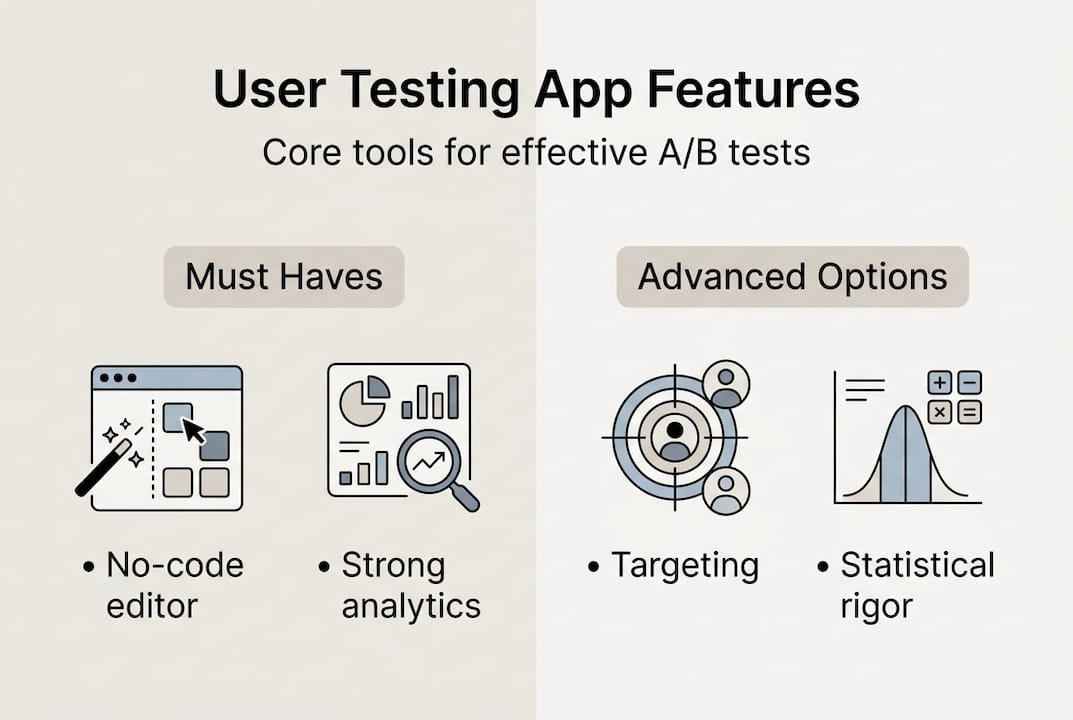
Not all tools are built the same. Some require developer involvement for every test setup. Others are bloated with features that small teams will never use. When evaluating your options, focus on these must-have capabilities:
- No-code visual editor: You should be able to create and launch tests without touching code
- Robust analytics and reporting: Look for built-in statistical significance calculators, not just raw numbers
- Audience targeting and segmentation: The ability to test on specific traffic sources, devices, or user types
- Multiple goal types: Support for clicks, form submissions, revenue events, and custom conversions
- Performance-friendly script: A heavy tracking script slows your site and skews results
One of the most underrated factors is statistical rigor in reporting. Many tools show you a percentage lift and a green checkmark without telling you whether the result is actually reliable. Peeking at results before a test reaches its planned sample size inflates false positives to 20 to 30%, meaning you could be implementing changes that do not actually work.

Here is a quick comparison of popular top A/B testing apps to help you evaluate your options:
| Tool | No-code editor | Statistical reporting | Ideal for | Starting price |
|---|---|---|---|---|
| GoStellar | Yes | Advanced | SMBs | Free tier available |
| Optimizely | Yes | Advanced | Enterprise | High (custom pricing) |
| VWO | Yes | Intermediate | Mid-market | Mid-range |
| Google Optimize | Limited | Basic | Beginners | Free (discontinued) |
| AB Tasty | Yes | Intermediate | Mid-market | Mid-range |
For most small to medium-sized businesses, the right choice sits at the intersection of ease of use and statistical credibility. Explore A/B testing platforms that match your current traffic volume and team size before committing.
The right way to run A/B tests with your user testing app
After selecting a tool, it is crucial to set up your tests correctly. Here is how to do it step by step.
- Establish your baseline: Pull at least two to four weeks of historical data on your current conversion rate before changing anything
- Write a hypothesis: Frame it as "If I change X, then Y will improve because Z." This keeps your test focused
- Calculate your sample size: Use the sample size formula n = 16 × p × (1-p) / (MDE)². For a 3% baseline conversion rate with a 20% minimum detectable effect, you need roughly 13,000 visitors per variant
- Set up the test in your app: Use the visual editor to make your change, configure your goal, and set your traffic split
- Run for the full planned duration: Commit to 2 to 4 weeks minimum, regardless of early results
- Analyze only at the end: Check your A/B testing checklist before declaring any winner
Here is a reference table for sample sizes at common baseline rates:
| Baseline conversion rate | MDE (20% relative) | Visitors needed per variant |
|---|---|---|
| 1% | 0.2% | ~39,000 |
| 3% | 0.6% | ~13,000 |
| 5% | 1.0% | ~7,700 |
| 10% | 2.0% | ~3,700 |
One of the most dangerous habits in A/B testing is running too many simultaneous tests without adjusting for multiple comparisons. Running 20 tests at 95% confidence gives you a 64% chance of at least one false positive. That is not a testing program. That is noise.
If you are working without a developer, the guide on A/B testing without dev support covers practical workarounds for common setup challenges.
Pro Tip: Write your stopping rule before the test starts. Decide in advance what sample size and duration you need, then stick to it. Teams that commit to this one habit see dramatically more reliable results.
Making sense of your results: Analysis and real-world application
Running a test is only half the battle. Making smart decisions with your results is where growth happens.
Before you act on any result, verify that your test met all three decision criteria:
- Full duration completed: The test ran for the planned number of days, not just until it looked good
- Sample size reached: Both variants received the minimum number of visitors you calculated upfront
- Statistical significance achieved: Your result crossed the 95% threshold, confirming it is unlikely to be random
Declare a test winner only after all three criteria are met, not just one or two. Skipping any of these steps is how teams end up implementing changes that hurt performance.
What about tests that show no clear winner? This is where most teams get discouraged, but it is actually a valuable outcome. A flat result tells you that the change you tested does not meaningfully affect behavior. That is useful information. It narrows your hypothesis space and points you toward bigger, more impactful variables to test next.
"A test that does not produce a winner still produces a lesson. The teams that grow fastest are the ones that treat every result, positive or flat, as a building block for the next experiment."
For practical examples of how this plays out in real campaigns, the guides on A/B test landing pages and A/B testing best practices are worth bookmarking. Focus on how each test result, whether it wins or not, moves your conversion rate understanding forward.
Why most businesses miss out on true A/B test wins
Here is an uncomfortable truth: the technical side of A/B testing is not what separates high-growth teams from stagnant ones. The real differentiator is what you do with results that are not clear wins.
Conventional wisdom says you only implement changes after a statistically significant positive result. That sounds responsible, but in practice it creates a culture of paralysis. Teams wait for proof before acting, run fewer tests, and learn more slowly than competitors who treat every experiment as useful data.
The smartest teams we have seen use flat and negative results just as aggressively as wins. A variant that loses tells you something your audience actively dislikes. A flat result tells you where not to spend optimization effort. Both are shortcuts to better hypotheses.
Bold iteration beats cautious validation almost every time. If you follow A/B test best practices and build a culture that celebrates learning rather than just winning, your testing program compounds over time. The teams that run 50 informed tests a year will always outperform the teams that run 10 "safe" ones.
Start optimizing today with a user-friendly testing app
You now have a clear blueprint for choosing, setting up, and learning from A/B tests. The next step is putting it into practice with a tool that does not slow you down.

GoStellar's user testing app is built specifically for marketers and product managers who want fast, reliable experimentation without writing a single line of code. With a 5.4KB script that barely touches your page speed, a no-code visual editor, and real-time analytics, you can launch your first test today. There is even a free plan for businesses under 25,000 monthly tracked users. If you are ready to run A/B tests without dev support, GoStellar makes it straightforward from day one.
Frequently asked questions
How much traffic do I need to run a valid A/B test with a user testing app?
For a baseline conversion rate of 3% and aiming to detect a 20% improvement, you need about 13,000 visitors per variant for statistically valid results. Lower traffic sites should focus on qualitative research or test larger, more impactful changes.
What features should marketers prioritize when selecting a user testing app?
Prioritize no-code editing, robust analytics, audience targeting, and strong statistical reporting to ensure your results are trustworthy and actionable. Tools that skip rigorous statistical reporting can lead you to implement changes that do not actually improve performance.
How long should I let my A/B test run using a user testing app?
Most valid A/B tests should run a minimum of 2 to 4 weeks to capture full user behavior cycles and avoid skewed results from day-of-week traffic patterns.
What are common mistakes to avoid in A/B testing with user testing apps?
Avoid peeking at results before tests end, since peeking inflates false positives to 20 to 30%. Also avoid running too many simultaneous tests without corrections, which can push your false positive rate above 60%.
Recommended
Published: 4/1/2026