
Handle traffic surges with expert load testing services
TL;DR:
- Load testing proactively prevents site crashes during viral campaigns, safeguarding revenue and brand reputation.
- Different testing methodologies reveal unique system weaknesses critical for campaign success and scalability.
- Integrating automated, realistic load testing into workflows enhances resilience and optimizes marketing ROI.
Your marketing campaign just went viral. Traffic is flooding in. Then the site crawls to a halt, and thousands of potential customers bounce before converting. This scenario plays out more often than most SMB marketers expect, and the culprit is almost always a lack of preparation. Load testing simulates expected and peak user loads to measure response times, throughput, error rates, and identify bottlenecks before real users feel the pain. This guide breaks down what load testing services do, how to run them effectively, and how to pick the right one for your team.
Table of Contents
- Why load testing matters for modern marketers
- Key load testing methodologies every business should know
- How load testing services actually work: step-by-step guide
- Hidden pitfalls and best practices in modern load testing
- How to choose the right load testing service for your team
- Our take: what most growth teams miss about load testing
- Take your site's performance to the next level
- Frequently asked questions
Key Takeaways
| Point | Details |
|---|---|
| Essential for campaigns | Load testing ensures your site withstands traffic spikes so your marketing campaigns succeed. |
| Test methodologies matter | Baseline, spike, soak, and chaos tests uncover unique performance issues marketers must address. |
| Avoid common pitfalls | Use realistic scenarios and monitor for subtle signals to get actionable test results. |
| Choose wisely | Look for load testing platforms with automation, clear reporting, and support for growth surges. |
Why load testing matters for modern marketers
Every marketer knows the anxiety of a big campaign launch. You've spent weeks on creative, targeting, and copy. But if your site buckles under the resulting traffic, all that effort evaporates. Site speed and uptime are not just technical concerns. They are directly tied to revenue, customer trust, and campaign ROI.
The numbers from real-world campaigns tell a clear story. An e-commerce SMS campaign autoscaled from 3 to 25 servers for 20,000 users, cutting infrastructure costs by 85%. Rakuten France handled an 819% traffic spike in 2 minutes using smart queuing. Another brand reduced page load time from 4.5 seconds to 1.2 seconds after managing a 400% surge with CDN and load balancing. These outcomes were not accidental. They came from deliberate preparation.
Skipping load testing exposes your business to serious risks:
- Revenue loss: Every second of slowdown costs conversions. Slow pages bleed sales.
- Customer churn: Users who hit a broken or sluggish site rarely return.
- Expensive downtime: Emergency fixes during a live campaign cost far more than proactive testing.
- Brand damage: A crashed site during a viral moment turns positive buzz into negative press.
"The goal is not just to test under average conditions. You need to simulate real-world surges, including the messy, unpredictable spikes that campaigns actually generate."
Understanding CRO performance testing benefits makes it clear that performance and conversion rate optimization are inseparable. Faster pages convert better, and load testing is how you guarantee speed under pressure. The relationship between load time and conversions is well documented. Even a one-second delay can reduce conversions by double digits. Growth teams that treat load testing as a marketing function, not just a DevOps task, consistently outperform those that don't.
Key load testing methodologies every business should know
Not all load tests are created equal. Each methodology is designed to answer a different question about your site's behavior. Choosing the right one depends on what risk you're trying to prevent.
Key methodologies include baseline testing, ramp-up, spike testing, soak testing, scalability testing, and combined load plus chaos testing. Here's how they break down:
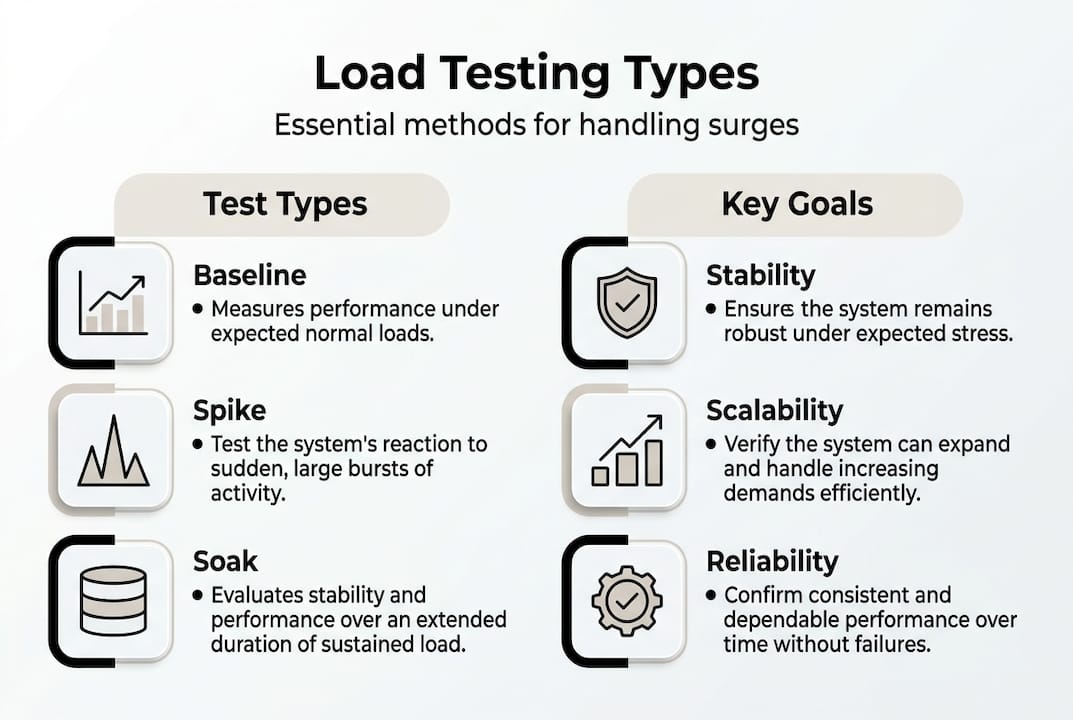
| Method | Purpose | What it reveals |
|---|---|---|
| Baseline | Measure normal performance | Your starting benchmark |
| Ramp-up | Gradually increase load | Where performance degrades |
| Spike | Sudden traffic burst | Resilience under shock loads |
| Soak | Sustained load over time | Memory leaks, slow degradation |
| Scalability | Increase load incrementally | Capacity limits and cost thresholds |
| Chaos | Inject failures during load | System resilience and recovery |
Each test type gives you a different lens on your infrastructure. Baseline testing tells you where you stand today. Ramp-up testing shows you exactly when things start breaking. Spike testing is the most campaign-relevant because it mirrors what actually happens when a promotion goes live or a social post goes viral.

Soak testing is often overlooked by smaller teams, but it's critical for catching slow-burn problems like memory leaks that only appear after hours of sustained traffic. Scalability testing helps you plan infrastructure budgets. Chaos testing, increasingly mainstream in 2026, combines load with deliberate failure injection to see how your system recovers.
For teams thinking about integrating testing into marketing automation, knowing how often to test is just as important as knowing which test to run.
Pro Tip: Don't just test for speed. Test for resilience and real user scenarios. A site that handles 10,000 concurrent users but crashes on the 10,001st is a liability, not an asset.
How load testing services actually work: step-by-step guide
Knowing the methodology is one thing. Understanding the actual process helps you work more effectively with any load testing service you choose.
Here's the standard workflow that reliable services follow, based on industry best practices:
- Define objectives and SLAs: Set clear targets. What response time is acceptable? What error rate is tolerable? Without these benchmarks, you can't judge results.
- Identify test scenarios from production data: Use real traffic logs to understand which user journeys matter most. Don't guess.
- Mirror the production environment: Testing on a staging server that doesn't match production gives you misleading results. This is one of the most common and costly mistakes.
- Script realistic user behaviors: A test that just hammers your homepage is not realistic. Script full user journeys: search, browse, add to cart, checkout.
- Configure load parameters: Set virtual user counts, ramp-up rates, and test duration based on your campaign projections.
- Execute the test: Run it and monitor in real time. Don't just start it and walk away.
- Analyze results via logs and APM tools: Look at response times, error rates, server resource usage, and queue behavior.
- Iterate and fix: Load testing is not a one-time event. Fix bottlenecks and retest.
For SaaS testing optimization, integrating this process into your regular workflow is what separates reactive teams from proactive ones.
Pro Tip: Automate load tests in your CI/CD pipeline. Every code deployment should trigger a performance check, not just a functional one. This catches regressions before they reach your users.
Hidden pitfalls and best practices in modern load testing
Even teams that run load tests regularly can fall into traps that make their results unreliable or misleading. Knowing what to watch for saves you from a false sense of security.
Realistic user journeys are the foundation of a valid test. Monitor golden signals (latency, traffic, errors, saturation), replay production traffic, and combine load testing with chaos for true resilience. Be especially wary of early saturation indicators.
For context on real-world concurrency limits, GPT-OSS-120B on H100 GPU handles roughly 400 to 500 concurrent requests before performance degrades. This kind of empirical benchmarking shows exactly why understanding your own system's limits matters.
Here are the most common warning signs that your test results are not trustworthy:
- Virtual users are not following realistic paths (e.g., skipping authentication steps)
- The test environment has different hardware or network configurations than production
- You're only measuring average response time, not 95th or 99th percentile
- Client-side load generators are hitting their own resource limits
- Queue saturation is happening at the generator, not the server
| Common pitfall | Best practice solution |
|---|---|
| Artificial load patterns | Use production traffic replays |
| Ignoring memory over time | Always include soak tests |
| Missing client-side failures | Monitor load generator metrics |
| Testing only happy paths | Script edge cases and error flows |
| Single-metric focus | Track all four golden signals |
For teams focused on conversion testing tips, the connection between performance testing and conversion rate is direct. A test that misses real bottlenecks gives you false confidence heading into a campaign.
How to choose the right load testing service for your team
With dozens of tools and services available, the decision can feel overwhelming. Focus on a few key criteria that actually matter for SMB marketing teams.
AI and chaos integration are rising priorities in 2026 for autonomous testing. Performance regressions from dependencies and upgrades also make CI integration a must-have, not a nice-to-have.
Here's what to look for when evaluating a load testing service:
- Reporting clarity: Can non-technical stakeholders understand the results? Good services provide dashboards that translate data into business impact.
- Automation features: Does it integrate with your CI/CD pipeline for continuous testing?
- Scalability support: Can it simulate the traffic volumes your campaigns actually generate?
- Compliance and SLA guarantees: Does the service offer uptime and data security commitments?
- Integration ease: Does it connect with your existing monitoring and analytics stack?
- AI-driven testing: Does it use machine learning to generate more realistic load patterns or identify anomalies automatically?
- Cost transparency: Are pricing tiers clear, and does the depth of testing justify the cost?
A trustworthy service will offer a clear methodology, transparent pricing, and references from businesses similar to yours. Avoid services that only report average metrics. The 99th percentile is where real user pain lives.
Reviewing page load time benchmarks before you start helps you set realistic SLA targets and evaluate whether a service's results are meaningful for your specific goals.
Our take: what most growth teams miss about load testing
Here's the uncomfortable truth most load testing guides won't tell you. Conventional wisdom in this space is obsessed with raw throughput numbers. Teams celebrate hitting 10,000 concurrent users without asking whether that metric actually maps to a business outcome.
The best growth teams we've seen tie every load testing insight directly to KPIs like conversion rate, revenue per session, and customer retention. Throughput is just a proxy. What you really want to know is: does my site hold up well enough to convert visitors into customers under pressure?
Another gap is the failure to automate. Running a load test before a big campaign launch and calling it done is not a strategy. Integrating tests into your CI/CD pipeline means every code change gets a performance check. This is how you catch regressions before they cost you.
Focusing on edge cases rather than averages is also where competitive advantage hides. The 99th percentile user, the one on a slow mobile connection during a flash sale, is often the customer most likely to churn. Testing for optimizing conversions means designing tests that reflect those real-world conditions, not just the clean, ideal scenario.
Take your site's performance to the next level
Load testing is only part of the performance equation. Once your site can handle the traffic, the next question is whether your pages are actually converting those visitors. That's where experimentation becomes essential.

Stellar at GoStellar gives marketers and growth hackers a fast, lightweight A/B testing platform built for exactly this kind of high-stakes environment. With a 5.4KB script that won't slow your site down, a no-code visual editor, and real-time analytics, you can run experiments that directly improve performance under pressure. Pair load testing with smart experimentation and you have a full-stack growth engine. Explore marketing automation and A/B testing tips to see how these strategies work together.
Frequently asked questions
What is the main benefit of using load testing services for marketers?
Load testing services ensure your site stays fast and reliable during traffic surges, preventing lost sales and customer frustration before they happen. By simulating peak user loads, you identify bottlenecks before real visitors experience them.
How often should SMBs run load tests on their websites?
Run load tests before major campaigns, after significant site updates, and at least quarterly for ongoing assurance. Integrating tests into your CI/CD pipeline makes continuous performance validation automatic.
What's the difference between spike and soak testing?
Spike testing checks your site's resilience against sudden, sharp traffic bursts, while soak testing reveals slow-burn issues like memory leaks during long, sustained loads over hours.
What are early warning signs of performance problems during load testing?
Watch for rising queue times, memory usage climbing steadily, and errors in golden signals like latency, traffic, and saturation. These patterns signal bottlenecks before full failure.
How is AI changing the landscape of load testing services?
AI enables more autonomous, realistic load tests and integrates chaos engineering to surface weaknesses proactively. AI-driven autonomous testing is becoming a standard expectation for modern load testing platforms in 2026.
Recommended
- Web application testing services: Boost CRO with smarter experiments
- Web Application Performance Testing: 2025 Guide for CRO & Growth Marketers
- Page Load Time Benchmarks 2025: Essential Guide for Marketers
- Performance-First Split Testing: Why Every Millisecond Matters
- 360 Monitoring - inSave Hosting
- Pocket App | Ensuring Scalability: Future-proof Your App with Pocket App
Published: 4/3/2026