
Optimizely Shopify: A/B Testing Guide for 2026
TL;DR:
- Optimizely is an enterprise experimentation platform that enhances Shopify conversion rates through advanced testing and personalization. It integrates with Shopify via app or JavaScript snippets, enabling audience segmentation and detailed analytics through tools like GA4 and Segment. Success depends on proper implementation, disciplined testing design, and matching user IDs across platforms; without these, data accuracy and campaign effectiveness suffer.
Optimizely is an enterprise-grade experimentation platform that helps Shopify store owners improve conversion rates through advanced A/B testing, multivariate experiments, and website personalization. Pairing Optimizely with Shopify gives merchants the ability to test product page layouts, checkout flows, and promotional offers with statistical rigor. Tools like Google Analytics 4 and Segment connect directly to Optimizely, turning raw experiment data into audience segments and revenue reports. This guide covers integration methods, test design best practices, analytics wiring, and the pitfalls that trip up even experienced teams running Shopify conversion optimization programs.
How does optimizely integrate with shopify?
The Optimizely Shopify integration runs through two main paths: installing a dedicated app or inserting the Optimizely JavaScript snippet directly into your Shopify theme's theme.liquid file. The app route, such as the Optimizely by Impress listing in the Shopify App Store, handles snippet injection automatically. The manual snippet method gives you more control over placement and load order, which matters for page speed.

Once the snippet is live, you can sync your Shopify product catalog and sales data with Optimizely to power audience targeting. For example, you can create segments based on product category views or cart value, then serve personalized variations to those segments.
Connecting GA4 and Google Tag Manager
GA4 integration inside Optimizely works through a built-in toggle in the Optimizely settings panel or through Google Tag Manager. Enabling it automatically creates GA4 audiences tied to each experiment variation. That means you can remarket to users who saw Variation B of your product page without writing a single line of custom code.
Google Tag Manager is the better choice when your Shopify store already uses a tag management layer. You fire a custom event from Optimizely's activation callback, GTM picks it up, and GA4 records the variation exposure. This keeps your data layer clean and auditable.
Avoiding Duplicate Event Fires
Duplicate event firing is the most common technical mistake in Optimizely setups. Bidirectional integrations with Segment, for instance, can send the same experiment impression twice if you enable both the native Segment destination and a custom analytics integration at the same time. Pick one method and disable the other before you go live.
Pro Tip: After launching any new Optimizely integration, open your GA4 DebugView or Segment's event stream and confirm that each experiment impression fires exactly once per session. Catching duplicates before traffic scales saves hours of data cleanup later.
What are best practices for a/b testing on shopify with optimizely?
Sound test design matters more than the tool you use. The choice of testing tool is less important than the quality of your hypothesis, your traffic split, and how long you run the test. Optimizely gives you the controls to do it right, but only if you use them correctly.
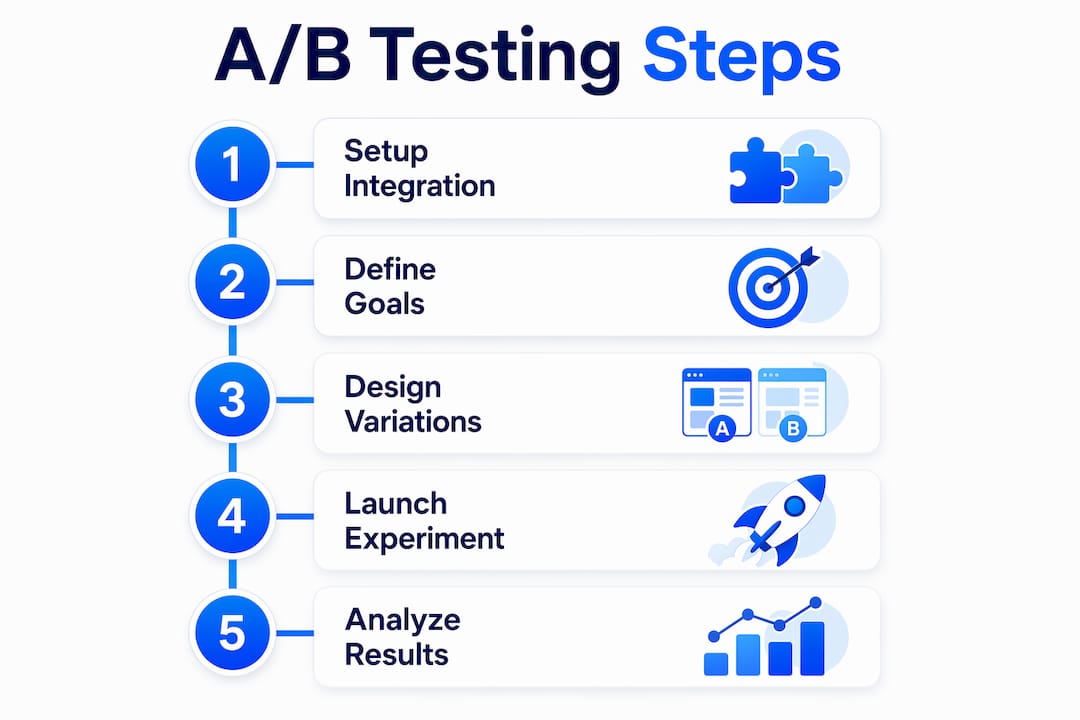
Follow these steps to run tests that produce reliable results:
- Write a specific hypothesis. State what you are changing, why you expect it to improve a metric, and what metric you are measuring. "Changing the CTA button from gray to orange will increase add-to-cart rate because it creates stronger visual contrast" is a testable hypothesis. "Let's try a new button color" is not.
- Split traffic 50/50. Shopify recommends a 50/50 traffic split per variation and a minimum of 1,000 visitors per variant before drawing conclusions. Uneven splits inflate variance and make results harder to interpret.
- Set a 95% confidence threshold. Optimizely's stats engine defaults to 95% confidence. Do not call a winner below that threshold, even if the lift looks promising after two days.
- Run tests for at least two full business cycles. One week is rarely enough. Weekday and weekend shopping behavior on Shopify stores differs significantly, and cutting a test short on a Friday spike produces false positives.
- Test one variable at a time on single pages first. Multi-page tests and multivariate experiments are powerful, but they require much larger sample sizes. Start with single-page tests on your highest-traffic pages, such as the product detail page or the cart.
- Document every test. Record the hypothesis, start date, traffic split, result, and what you learned. This log becomes your store's institutional knowledge on what your customers actually respond to.
Pro Tip: If your store gets fewer than 50,000 monthly visitors, mid-market A/B testing tools will reach statistical significance faster than Optimizely because they require less configuration overhead. Move to Optimizely when you need cross-device testing or complex audience segmentation.
How do optimizely's analytics integrations work for shopify experiments?
Optimizely's real value for Shopify merchants is not the visual editor. It is the depth of its analytics integration options that lets you route experiment data into every reporting tool your team already uses.
| Integration Method | Best For | Key Limitation |
|---|---|---|
| GA4 Built-in Toggle | Teams using GA4 as primary analytics | Limited custom dimension control |
| Google Tag Manager | Stores with existing GTM setup | Requires GTM expertise to configure |
| Segment Native Destination | Teams using Segment as a data hub | Risk of duplicates if combined with custom integration |
| Custom Analytics (track_layer_decision) | Internal dashboards or data lakes | Requires JavaScript development work |
The custom analytics integration is the most flexible option. Optimizely exposes a track_layer_decision callback in JavaScript that fires every time a user enters an experiment. You attach your own function to that callback and push the variation data wherever you need it, whether that is a data warehouse, a Looker dashboard, or a custom reporting endpoint.
For reliable data delivery, Optimizely's documentation recommends using navigator.sendBeacon inside that callback. The sendBeacon method sends data asynchronously and does not block page unload, which means you capture experiment events even when a user immediately navigates away after the variation loads. Standard XMLHttpRequest calls can drop data in that scenario.
Segment users get a bidirectional flow: Optimizely pushes variation data into Segment, and Segment can push user traits back into Optimizely for audience targeting. The critical setup rule is to avoid duplicate events by choosing either the native Segment destination or the custom analytics integration, never both simultaneously.
Consistent user IDs across platforms are non-negotiable. If Optimizely assigns a user ID that does not match the ID in Segment or GA4, you get attribution drift. Variation B might appear to underperform simply because its conversions are being credited to anonymous sessions in your analytics tool. Map your Shopify customer ID or a persistent cookie value as the Optimizely user ID from day one.
What are the common pitfalls of using optimizely on shopify?
Optimizely is intended for organizations with dedicated conversion rate optimization and engineering resources, typically those generating over $100,000 per month in revenue. That context shapes every decision about whether and how to use it.
Watch for these specific problems:
- Cost misalignment. Optimizely's pricing typically starts at several thousand dollars per month. For a Shopify store doing $20,000 per month, that spend is disproportionate. The tool's power only pays off when you have enough traffic to run multiple concurrent experiments and a team to act on results.
- Inconsistent user IDs. As noted above, mismatched IDs between Optimizely and your analytics stack cause attribution drift. Audit your ID mapping before launching any experiment.
- Duplicate event firing. Enabling both the Segment native destination and a custom analytics integration simultaneously creates duplicate impression and conversion events. Those duplicates inflate your sample size counts and distort conversion rate calculations.
- Multivariate test complexity. Running a multivariate test across Shopify's product page, collection page, and cart simultaneously requires exponentially more traffic than a simple A/B test. Most Shopify stores do not have the volume to run these cleanly.
- Governance gaps as you scale. When multiple team members launch experiments without a shared naming convention or hypothesis log, you end up with overlapping tests that contaminate each other's results.
Pro Tip: Before adding Optimizely to your Shopify store, audit your current Shopify analytics setup to confirm that GA4 is firing correctly on all key pages. A broken analytics foundation makes any experimentation tool unreliable, regardless of how sophisticated it is.
Key takeaways
Optimizely delivers the most value on Shopify when analytics wiring, test design, and traffic volume are all in place before the first experiment launches.
| Point | Details |
|---|---|
| Integration method matters | Choose snippet insertion or a Shopify app, then connect GA4 or GTM for clean event tracking. |
| Traffic and duration are non-negotiable | Run tests with at least 1,000 visitors per variant at a 95% confidence threshold before calling a winner. |
| Avoid duplicate events | Never enable both Segment's native destination and a custom analytics integration at the same time. |
| Match user IDs across platforms | Consistent IDs between Optimizely and GA4 or Segment prevent attribution drift in your reports. |
| Scale before committing to Optimizely | Stores under $100K per month in revenue often get better ROI from lighter A/B testing tools first. |
Why test design beats tool selection every time
I have reviewed experimentation programs at Shopify stores ranging from $30,000 to $3 million per month in revenue, and the pattern is consistent. The stores with the best results are not always the ones using Optimizely. They are the ones with a disciplined hypothesis log, clean analytics, and a team that reads results critically instead of declaring winners on day three.
Optimizely is genuinely excellent for large Shopify operations. Its GA4 integration, Segment support, and custom analytics callback give you a level of data fidelity that lighter tools cannot match. But I have watched teams spend six months configuring Optimizely integrations and never run a single statistically valid test because they got lost in the setup.
My honest recommendation: if your store is below $100,000 per month, start with a no-code A/B testing tool that gets you running experiments in a day. Build your testing muscle, your hypothesis discipline, and your analytics hygiene first. Then graduate to Optimizely when the complexity of your experiments actually demands it. The tool should serve your process, not define it.
The merchants who get the most from Optimizely on Shopify are the ones who treated it as infrastructure, not a shortcut. They wired it to GA4 and Segment correctly, matched their user IDs, and ran tests for full business cycles. That discipline is available to any store owner willing to invest in it.
— Juan
Run smarter shopify experiments with Gostellar
If you are ready to put experimentation to work on your Shopify store but want to start without the overhead of an enterprise platform, Gostellar is built for exactly that. Gostellar's 5.4KB script loads faster than any competing tool, so your store's performance stays intact while you test. The no-code visual editor lets you launch your first A/B test in minutes, and real-time analytics show you results as they happen.

Gostellar's A/B testing platform supports advanced goal tracking, dynamic keyword insertion for personalized landing pages, and a free plan for stores with under 25,000 monthly tracked users. Whether you are testing a new product page layout or a revised checkout CTA, Gostellar gives you the data to make the call with confidence. Start your free account today and run your first experiment before the week is out.
FAQ
What is optimizely used for on shopify?
Optimizely is used on Shopify to run A/B tests, multivariate experiments, and personalization campaigns that improve conversion rates and customer engagement. It connects to GA4, Segment, and custom analytics pipelines for detailed experiment reporting.
How do i add optimizely to my shopify store?
You can add Optimizely by installing a compatible Shopify app or by pasting the Optimizely JavaScript snippet into your theme's theme.liquid file. The manual snippet method gives you more control over load order and performance.
How much traffic do i need for shopify a/b testing with optimizely?
Shopify recommends at least 1,000 visitors per variation and a 95% confidence threshold before reading results. Stores with lower traffic should run tests longer or use tools designed for smaller sample sizes.
What are the best optimizely alternatives for smaller shopify stores?
Smaller Shopify stores typically get better results from lighter experimentation tools that require less configuration and reach significance faster. Optimizely is best suited for stores generating over $100,000 per month with dedicated CRO resources.
How do i prevent duplicate events in optimizely's segment integration?
Choose either the native Segment destination or Optimizely's custom analytics integration, never both at the same time. Running both simultaneously causes duplicate events that inflate impression counts and distort conversion rate data.
Recommended
Published: 6/11/2026