
Performance & load testing explained: boost UX fast
TL;DR:
- Load testing reveals the true capacity of websites during traffic surges, preventing revenue loss.
- Effective load tests include baseline, spike, and soak scenarios with tail latency and error rate metrics.
- Continuous, realistic performance testing integrated into marketing workflows ensures campaign readiness.
Even a single slow-loading page can slash conversion rates by double digits during a marketing campaign, and most growth teams underestimate how much complexity hides behind a "simple" load test. Running a quick test that simulates a hundred users hitting your homepage tells you almost nothing about how your site will behave when a flash sale drives a thousand simultaneous visitors to a checkout flow. The gap between what most teams test and what actually breaks under pressure is wide. This guide defines the core concepts, walks through realistic test design, helps you pick the right tools, and shows you how to bake performance testing into your ongoing marketing operations.
Table of Contents
- What is performance testing and load testing?
- How to design meaningful load tests: Scenarios, metrics, and common pitfalls
- Choosing tools: Matching protocols, workflows, and integration needs
- Continuous performance testing: Shift-left, fast checks, and campaign readiness
- The uncomfortable truth: Why most load tests fail marketing teams
- How Gostellar powers smarter load testing for marketers
- Frequently asked questions
Key Takeaways
| Point | Details |
|---|---|
| Model realistic traffic | Realistic user scenarios prevent misleading test results and strengthen campaign performance. |
| Track the right metrics | Monitor tail latency and error rates during load tests to ensure user experience isn’t compromised. |
| Avoid environment mismatches | Test on production-like infrastructure and data to expose real bottlenecks and prevent false positives. |
| Use continuous testing | Integrate fast load tests into your workflow and schedule deeper runs before launches to catch regressions early. |
What is performance testing and load testing?
These two terms get used interchangeably, but they mean different things and serve different purposes. Understanding the distinction saves you from designing tests that give you false confidence.
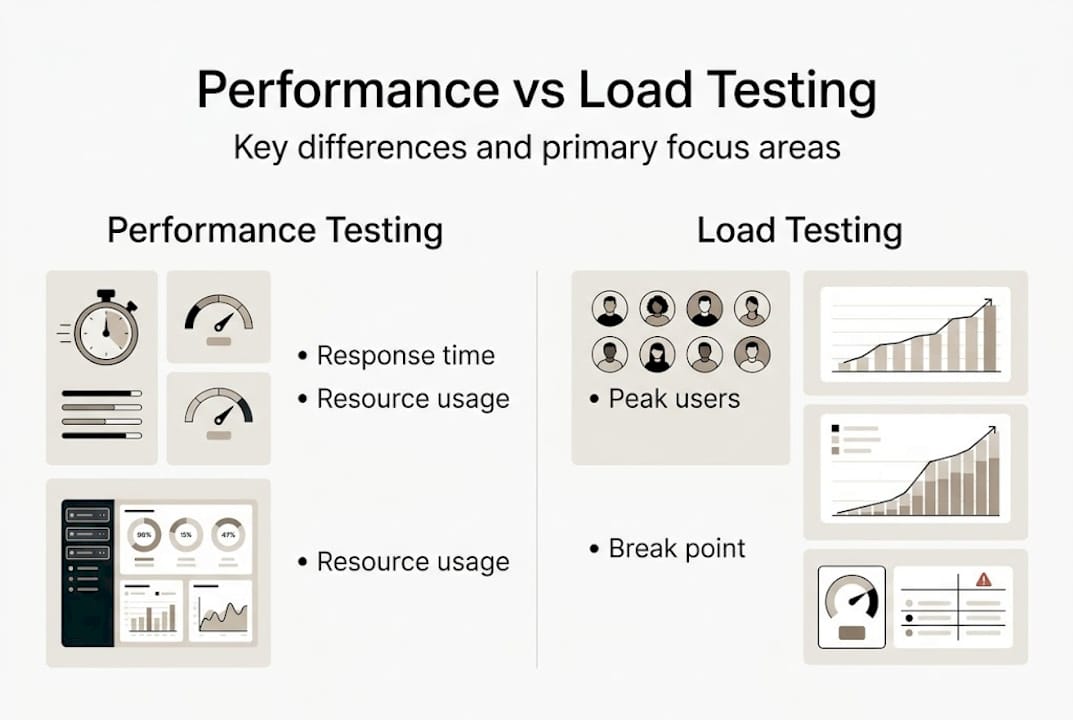
Performance testing is the broader category. It measures how your website behaves across a range of conditions, covering speed, stability, and scalability. Think of it as a health checkup for your entire site. Web application performance testing encompasses everything from response time benchmarks to resource utilization under stress.
Load testing is a specific type of performance test. It simulates real user activity at defined volumes to identify where bottlenecks appear. You send a controlled stream of virtual users through your site and watch where things start to break down. The goal is not just to confirm that your site works, but to find the exact point where user experience degrades.
Here is why both matter for marketing teams:
- Campaign launches send unpredictable traffic spikes. A landing page that loads in 1.2 seconds under normal conditions might crawl to 6 seconds when your paid campaign kicks in.
- Checkout and conversion flows are where slow performance costs real revenue. A stall at the payment step is not a technical inconvenience. It is a lost sale.
- Third-party scripts like chat widgets, analytics tags, and A/B testing tools each add load. Testing under realistic conditions means including all of them.
- Database queries that run fine in isolation can become bottlenecks when dozens of users hit them simultaneously.
The types of load testing you choose depend on your goals. Stress tests push your system past its limits. Soak tests run sustained load over hours to catch memory leaks. Spike tests mimic sudden traffic surges.
One of the most effective approaches for growth teams is stepped or ramped load testing. Instead of flooding your site all at once, you gradually increase virtual users and observe where tail latency and error rates begin to rise sharply. According to AWS Prescriptive Guidance, a practical methodology is to "model load using production-like scenarios and then apply stepped/ramped load to observe when tail latency and error rates start degrading nonlinearly." That nonlinear jump is your real performance ceiling, not the number you hit in a quick smoke test.
The goal of load testing is not to prove your site survives average traffic. It is to find the exact breaking point before your users do.
For marketing teams, this distinction is everything. Your average Tuesday traffic is not the scenario that tanks a campaign. It is the surge that follows a viral post or a big email send.
How to design meaningful load tests: Scenarios, metrics, and common pitfalls
Knowing what load testing is gets you halfway there. Designing tests that actually reflect reality is where most teams stumble.
Three scenario types every marketing site needs:
- Baseline/steady-state tests simulate normal, expected traffic. This is your control. It tells you how the site performs on a regular day and gives you a benchmark to compare against.
- Spike tests simulate a sudden, sharp surge in visitors, mimicking what happens when a campaign email goes out or a social post goes viral. This is the scenario most teams skip.
- Soak tests run a sustained, moderate load over several hours or even days. These catch slow-moving failures like memory leaks, database connection pool exhaustion, and gradual performance degradation.
Metrics that actually matter:
Do not just track average response time. Averages lie. If 95% of your users get a 1-second response but 5% wait 12 seconds, your average might look fine while a meaningful chunk of your audience abandons your site. Instead, focus on:
- p95 and p99 latency (tail latency): The response time experienced by the slowest 5% and 1% of users.
- Error rate: The percentage of requests that return errors under load.
- Conversion drop-off: How does your checkout or lead form completion rate change as load increases?
- Throughput: Can your server sustain the required number of requests per second during peak?
Pro Tip: Set latency thresholds before you run your test. Decide in advance that a p95 above 3 seconds is a failure. Without pre-defined pass/fail criteria, it is easy to rationalize bad results.
Common pitfalls that make results misleading:
Environment mismatches are the biggest culprit. Testing against a staging server with half the resources of your production environment will give you results that bear no relationship to real user experience. Similarly, using static, unrealistic test data means you never discover the slow database queries that only trigger with real user records. As Radview's research on reliability pitfalls highlights, testing only the "happy path" is a classic failure mode that produces dangerously misleading results.

| Test approach | What it tells you | What it misses |
|---|---|---|
| Happy path only | Site works under ideal conditions | Real user friction, error flows |
| Multi-scenario realistic | Bottlenecks, failure modes, UX degradation | Nothing significant, if done right |
| Single load spike | Peak survival | Sustained load, gradual failures |
| Continuous scenario coverage | Regression detection, trending issues | Requires ongoing investment |
For teams managing traffic surges during campaign launches, continuous and multi-scenario coverage is the only approach that gives you reliable confidence before go-live. Pairing this discipline with your A/B testing integration workflows means your experiments run on infrastructure you have already validated.
Choosing tools: Matching protocols, workflows, and integration needs
The right tool for your team depends on three criteria, and skipping any one of them leads to gaps in your testing coverage.
According to Ranorex's evaluation framework, the decision comes down to protocol coverage, realistic user workflow modeling, and CI/CD integration capability. Here is what each of those means in practice.
Protocol coverage refers to the types of traffic your tool can simulate. Most marketing sites need HTTP and HTTPS at minimum. If your platform uses APIs, WebSockets, or database connections, your tool needs to support those protocols too. A tool that only speaks HTTP will miss performance issues in your API layer entirely.
Realistic workflow modeling means your tests mimic how actual users behave, not just how robots ping endpoints. Real users think between clicks. They browse product pages, read descriptions, add items to carts, and sometimes abandon halfway through. Your tool needs to support:
- Think time: Pauses between actions that reflect real browsing behavior.
- Pacing: The rate at which virtual users start their sessions.
- Parameterization: Using varied data inputs so every user takes a slightly different path.
CI/CD integration is non-negotiable for teams that ship frequently. Your load tests need to run automatically when code changes, not just before major launches.
| Tool | Protocol support | Workflow realism | CI/CD integration | SMB-friendly |
|---|---|---|---|---|
| k6 | HTTP, WebSockets, gRPC | High (scripted) | Native | Yes |
| Apache JMeter | HTTP, JDBC, LDAP, FTP | High (GUI + scripting) | Via plugins | Moderate |
| Gatling | HTTP, WebSockets | High (code-based) | Native | Yes |
| BlazeMeter | HTTP, WebSockets | High (cloud-based) | Native | Moderate |
| LoadForge | HTTP | Moderate | Limited | Yes |
For most SMB marketing teams exploring no-code A/B testing tools, k6 or LoadForge hit the right balance of power and accessibility. Larger teams with engineering support may prefer JMeter or Gatling for their depth. The key principle from SaaS marketing optimization applies here too: pick the tool you will actually use consistently, not the most feature-rich option that collects dust.
Continuous performance testing: Shift-left, fast checks, and campaign readiness
One-time pre-launch testing is better than nothing, but it is not enough. Performance regressions happen quietly. A new script gets added to your tag manager. A third-party widget updates itself. A database index gets dropped. None of these show up in your monitoring until a campaign goes live and users start dropping off.
Continuous load testing treats performance as an ongoing discipline, not a pre-launch checkbox. The operational recommendation for SMBs is clear: integrate load testing into your regular workflow so regressions get caught before they reach production.
Shift-left means moving testing earlier in your development cycle. Instead of testing after a feature is built, you test during or even before. For marketing teams, this means:
- Running lightweight load checks every time a landing page template changes.
- Triggering automated performance tests when new scripts are added to your site.
- Including performance budgets in your campaign brief so engineering knows the constraints upfront.
Pro Tip: Set a performance budget for every campaign landing page. Define a maximum acceptable page weight, a p95 latency cap, and a minimum throughput target. Treat a page that exceeds these limits the same way you would treat a broken form.
Fast checks vs. comprehensive tests:
- Fast checks (2 to 5 minutes): Run in CI/CD on every deployment. These catch obvious regressions quickly.
- Scheduled comprehensive tests (30 to 60 minutes): Run weekly or before major campaigns. These cover soak, spike, and multi-scenario coverage in full.
- Pre-campaign readiness tests: Run 48 to 72 hours before a campaign launch. Leave time to fix what you find.
Best practices for campaign launch readiness include testing with production-equivalent infrastructure, using realistic data volumes, and running your full conversion funnel, not just the landing page. Teams that build this into their developing test ideas workflow catch issues that would otherwise only surface under live traffic. Integrating this with your smart SaaS testing approach compounds the value significantly.
The uncomfortable truth: Why most load tests fail marketing teams
Here is the reality most guides skip over: the majority of load tests that "pass" are not actually testing the right thing. They simulate average-day traffic on an environment that does not match production, using data that does not reflect real user behavior, and they declare success.
Then the campaign launches. Traffic spikes to three times the expected peak. The database buckles under concurrent writes. Tail latency explodes. Conversions crater.
The teams that avoid this outcome are not running more tests. They are running better-designed tests. They simulate the worst day, not the average day. They test the full funnel under sustained load, not just the homepage under a burst. They track p99 latency and error rates, not just average response time.
There is also a blind spot most marketing teams have around growth marketing strategies: performance testing is treated as a developer problem. It is not. When your campaign drives traffic that breaks your checkout, that is a marketing problem with a technical cause. Owning the testing process, setting pass/fail thresholds, and advocating for pre-campaign readiness reviews are things marketers and growth hackers need to drive. You do not need to write the scripts. You do need to define the standards.
How Gostellar powers smarter load testing for marketers
Understanding load testing is valuable. Acting on it before your next campaign is what actually protects your conversion rates.

Gostellar helps marketing teams model realistic traffic scenarios, pinpoint UX bottlenecks, and run A/B tests on infrastructure validated for performance. With a lightweight 5.4KB script, Gostellar adds negligible load while delivering real-time analytics and actionable insights. Whether you are optimizing a landing page for a product launch or running continuous experiments, Gostellar's platform connects performance data with experimentation outcomes. Explore the growth hacking framework to see how performance-aware testing translates directly into faster, more reliable campaign wins.
Frequently asked questions
How do I know if my website needs load testing?
You should load test if your website experiences traffic spikes from campaigns or is mission-critical for conversions, even if you have not noticed slowdowns yet. Marketing campaigns typically require at least three scenario types: baseline, spike, and soak.
What metrics matter most in load testing for marketing sites?
Key metrics include tail latency (p95/p99), error rate, conversion drop-off under load, and sustained throughput during campaign spikes. Percentile-based reporting supports user-visible UX targets far better than averages.
How often should performance/load tests be run?
Integrate fast checks in CI/CD pipelines on every deployment and schedule comprehensive tests before campaigns or major releases. Treat load testing as a continuous discipline rather than a one-time pre-launch event.
Can load testing tools simulate real user workflows?
Yes. Select tools that offer workflow parameterization, pacing, and protocol support to simulate marketing-driven traffic accurately. Realistic workflow modeling is one of the three critical criteria for tool selection.
Recommended
- Handle traffic surges with expert load testing services
- Web UI testing guide: Boosting UX and performance for SMBs
- Page Load Time Benchmarks 2025: Essential Guide for Marketers
- Performance-First Split Testing: Why Every Millisecond Matters
- The Fastest Way to Stress-Test a Business | John Galt Finance
Published: 4/18/2026