
User testing UX: efficient methods for lean teams
TL;DR:
- Marketers can effectively identify most usability issues with only five users, saving time and resources.
- Using methods like RITE enables small teams to quickly iterate and improve key user flows for better conversions.
Most marketers assume they need dozens of participants to draw meaningful conclusions from user testing. That assumption costs time, money, and momentum. The reality is that the "5-user rule" uncovers the vast majority of usability problems with a surprisingly small sample, which means small teams can run effective user testing UX cycles without enterprise budgets or dedicated research departments. This guide breaks down the most practical methods for marketers and product managers who need fast, actionable answers about why users drop off, hesitate, or fail to convert.
Table of Contents
- What is user testing in UX and why it matters
- Popular efficient user testing methods for small teams
- Choosing between moderated and unmoderated user testing
- Recruiting participants and determining efficient sample sizes
- Measuring usability: key metrics and scales for conversion impact
- Best practices and expert pro tips for effective user testing UX
- Why fast, behavior-focused user testing trumps opinion surveys for SMB success
- Get started with efficient user testing on GoStellar
- Frequently asked questions
What is user testing in UX and why it matters
User testing UX focuses specifically on one question: can real people use your product to accomplish their goals without friction? That's narrower than general user research, which might explore attitudes, motivations, or market fit. Usability testing zeros in on ease of use and task completion, which makes it directly relevant to conversion rates and retention.
The core method is deceptively simple. You watch real users complete realistic tasks on your product while they think aloud, narrating what they see, expect, and feel confused about. Usability testing observes real users completing realistic tasks to identify friction and improve product intuitiveness. What you learn is fundamentally different from survey data because behavior and opinion frequently diverge. Users say they would use a feature; then you watch them ignore it entirely.
Why this matters for marketers and product managers specifically:
- You stop guessing why your landing page bounce rate is high and start seeing the exact moment users give up.
- You identify copy, layout, or flow problems that no analytics dashboard will ever surface.
- You build internal alignment faster because a two-minute video clip of a confused user is more persuasive than a slide deck.
- You get ahead of issues before they compound into retention problems.
The connection between user testing and conversions is direct: friction in a task flow is friction in a purchase flow. Removing it removes a reason to leave. Teams that invest in understanding user behavior early in a launch cycle consistently outperform those who rely on post-launch analytics to diagnose problems.
Pro Tip: Record every session, even informal ones. A thirty-second clip of a user misreading your call-to-action button is the most compelling documentation you can show a skeptical stakeholder.
Popular efficient user testing methods for small teams
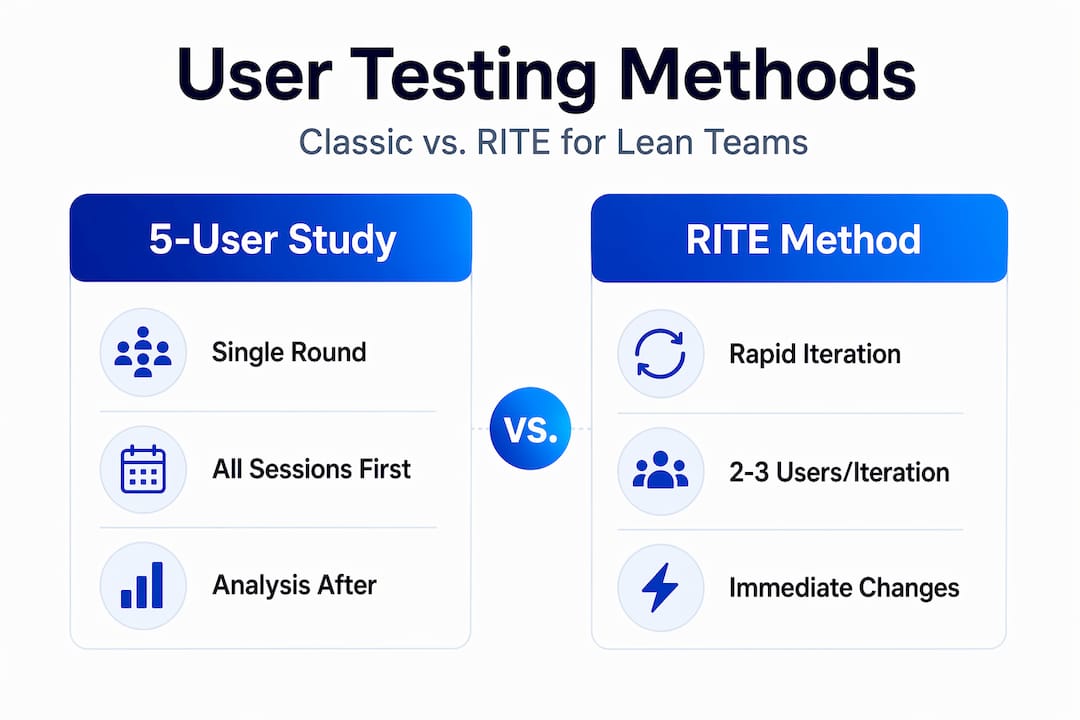
Two methods stand out for lean teams: the classic 5-user qualitative study and the RITE method (Rapid Iterative Testing and Evaluation). They serve different situations, and knowing when to use each is half the battle.
Jakob Nielsen's 5-user rule is the most widely cited benchmark in ux usability testing. Testing with 5 participants uncovers roughly 85% of usability problems for a given interface. The logic is mathematical: each additional user past five reveals fewer new problems because the most common issues have already surfaced. This makes a focused 5-person qualitative study the default starting point for most small teams.
The RITE method is built for even faster feedback. RITE tests prototypes rapidly with small groups, fixes issues immediately after each session, and iterates until no new problems emerge within five participants. You're not waiting for all sessions to finish before acting. You observe two or three users, identify a clear problem, fix it before the next session, and test the fix immediately.
Here's how a typical RITE cycle looks:
- Define realistic tasks aligned with your key conversion flow.
- Run sessions with two to three participants.
- Log all observed issues after each session, categorizing by severity.
- Fix Category A issues (critical blockers) before the next round of sessions.
- Retest the updated version with fresh participants.
- Stop when five participants complete sessions without surfacing new issues.
| Factor | Classic 5-user study | RITE method |
|---|---|---|
| Session count | 5 (all before analysis) | 2-3 per iteration |
| Time to first fix | After all sessions complete | Same day or next day |
| Best for | Baseline usability audits | Active product iteration |
| Team requirement | Analyst + facilitator | Any motivated product manager |
| Output | Issue list and report | Fixed product with tested improvements |
Pro Tip: Use RITE when you have a launch deadline bearing down on you. Classic studies are better when you need a documented baseline to compare future versions against.
The key to usability testing effectiveness is not the size of your study. It's the quality of your tasks and how quickly you act on what you learn.
Choosing between moderated and unmoderated user testing
Testing UX falls into two broad formats, and choosing the wrong one wastes either time or insight.
Moderated testing has a live facilitator, either in person or via video call, guiding the session. The facilitator can ask follow-up questions, prompt the user to keep thinking aloud, and probe unexpected behaviors in real time. This format is slower and more expensive to run at scale, but the qualitative depth is unmatched when you need to understand why something is confusing, not just that it is.

Unmoderated testing lets participants complete tasks on their own schedule using a testing platform. Sessions are recorded, and results aggregate automatically. You get data faster, at lower cost per participant, and across a wider geographic pool.
Key considerations when choosing:
- Use moderated when your product is complex, when tasks require explanation, or when you need to explore nuanced mental models.
- Use unmoderated when your tasks are self-explanatory, when you need volume quickly, or when you're testing a relatively mature interface.
- Mix both: run moderated first to understand the "why," then unmoderated to confirm at scale.
- AI-assisted tools for unmoderated testing now analyze video recordings and text responses to surface themes automatically, cutting synthesis time significantly. Maze supports both moderated and unmoderated testing with AI-powered reporting, helping teams scale testing and speed analysis.
One underused approach for small teams: run moderated sessions internally with colleagues outside your team. It's imperfect, but a five-minute hallway test with someone from accounting will surface basic navigation failures faster than two weeks of scheduling external participants.
Pro Tip: Don't confuse unmoderated testing with less rigorous testing. The task design still matters enormously. A poorly written task in an unmoderated study will generate useless data regardless of how many people complete it.
Understanding the difference between A/B testing versus user testing is also essential here. A/B testing tells you which version performs better. User testing tells you why. Both belong in your toolkit.
Recruiting participants and determining efficient sample sizes
The definition of usability testing includes the word "users," which means you need actual people from your target population, not just anyone willing to participate. Recruitment is where many small teams cut corners and then wonder why their findings don't translate to real improvements.
Start here:
- Define your segments clearly. A SaaS product might have two distinct user types: administrators and end users. Their needs differ dramatically. Test them separately.
- Recruit five per segment. Recruiting 5 participants per distinct user segment uncovers approximately 85% of usability problems for each group. One combined session of ten mixed participants will muddy your findings.
- Write a screener. A short five to seven question screener ensures participants match your target audience rather than just filling a slot.
- Set realistic incentives. Cash gift cards in the $50 to $100 range are standard for 45-minute sessions. Underpaying leads to low-quality engagement.
- Plan your recruitment timeline. External recruitment through panel services typically takes five to ten business days. Build that into your project schedule.
Practical tips for efficient recruitment:
- Your existing customers are often the easiest and most relevant pool. A short email to recent sign-ups asking for feedback participation converts well.
- LinkedIn outreach works for B2B products when you need specific job titles or industries.
- Avoid recruiting friends and family. They know too much about your product and will give you polite, optimistic responses instead of honest confusion.
- For early-stage products, secondary research can reduce the number of segments you need to test. Focus your limited recruitment budget on the highest-priority user type first.
Measuring usability: key metrics and scales for conversion impact
Knowing what to measure is just as important as knowing how to test. UX design testing without clear metrics produces impressions, not evidence.
The System Usability Scale (SUS) is the most widely used standardized tool. The SUS uses 10 statements rated on a 5-point scale to generate a 0-100 usability score, useful for benchmarking across versions and competitors. Participants respond to alternating positive and negative statements immediately after a test session. The scoring formula adjusts for statement direction and multiplies the sum to produce the final score.
How to interpret SUS scores:
| SUS score range | Grade | Interpretation |
|---|---|---|
| 85-100 | A+ | Excellent; best possible usability |
| 70-84 | B to A | Good; above average |
| 50-69 | C to D | Marginal; improvement needed |
| Below 50 | F | Poor; significant problems exist |
What to combine with SUS for a fuller picture:
- Task completion rate: The percentage of users who successfully completed each task. This is your most direct conversion-relevant metric.
- Time on task: How long users take to complete a task. Long times often signal confusion even when users eventually succeed.
- Error rate: How many wrong steps users take per task.
- Confidence intervals: When reporting SUS scores to stakeholders, always include the confidence interval. A score of 72 with a ±15 range is far less reliable than 72 with a ±4 range.
Connecting these metrics to usability and conversions is straightforward: a task completion rate below 70% on a checkout flow is a conversion problem, full stop. Fix the usability issue and the conversion rate follows.
Best practices and expert pro tips for effective user testing UX
Conducting usability testing well is about discipline in the details. Here's what separates studies that drive real improvements from ones that produce a document nobody reads.
What to do:
- Write tasks in terms of user goals, not product features. "Find a plan that fits a team of five" is better than "Navigate to the pricing page."
- Keep a rolling issues log during sessions. Note the timestamp, what the user did, and what they expected. Do this in real time, not from memory later.
- Prioritize Category A issues (complete task failures) for immediate fixing in RITE cycles. Category B issues (delays and confusion) come next. Cosmetic issues go on a backlog.
- Keep prototypes flexible and update-ready and empower teams to act on feedback quickly for best RITE success. A prototype that can't be modified between sessions defeats the purpose of iterative testing.
- Plan session length carefully. Sixty minutes is a practical maximum for moderated sessions before fatigue affects response quality. Twenty to thirty minutes works well for unmoderated formats.
What to avoid:
- Don't lead participants with questions like "Was that easy?" Ask neutral prompts: "What were you thinking when you saw that screen?"
- Don't test too many tasks in one session. Five to seven focused tasks is enough for a 45-minute session. More tasks dilute attention and data quality.
- Don't skip debrief questions. Asking "Was anything surprising or confusing?" at the end often surfaces issues that didn't appear during task observation.
Pro Tip: For landing page testing specifically, mobile-first test scenarios reveal issues that desktop testing misses entirely. More than half of your traffic may be mobile, but most teams still default to desktop testing.
Pair qualitative sessions with effective surveys sent before testing to understand baseline expectations, then compare what users said they expected with what they actually did.
Why fast, behavior-focused user testing trumps opinion surveys for SMB success
Here's the uncomfortable truth most marketing teams discover too late: the feedback you collect the easiest is rarely the feedback that helps you most.
Opinion surveys are fast, cheap, and politically safe to run. They also have a fundamental flaw. People are notoriously unreliable narrators of their own behavior. They tell you what they think they do, what they wish they did, or what they assume you want to hear. Usability testing works because you observe behavior while the participant thinks out loud, not just collecting opinions. That distinction is everything.
For small to medium businesses especially, the cost of acting on bad data is severe. You don't have the runway to rebuild a landing page three times based on survey feedback that turned out to be noise. One hour of moderated usability testing with five users will expose more actionable conversion blockers than a 500-response survey ever will, because you're watching behavior, not recording self-perception.
The RITE method makes this argument even stronger. RITE shortens feedback cycles, allowing teams to validate fixes during the process and reduce costly rework. You're not running a study to produce a report. You're running a study to improve the product in near real time. That's a fundamentally different value proposition, and it's the one that fits lean marketing and product teams perfectly.
The most productive shift any SMB team can make is to focus behavior-based testing on their single highest-impact conversion flow first. Not everything. One flow. Fix what you see. Then test the next one. This narrow focus is what makes user testing practical for driving real insight without requiring a full research operation.
Get started with efficient user testing on GoStellar
You now have the framework to run user testing UX cycles that are fast, focused, and directly tied to conversion outcomes. The next step is putting those cycles into a system that keeps delivering insight without eating your entire sprint.

GoStellar is built for exactly this kind of lean, impact-first experimentation. Whether you're validating a redesigned landing page or testing a new onboarding flow, the platform gives you the tools to move from insight to live test without technical overhead. Combine your qualitative usability findings with A/B testing to confirm fixes at scale. Start with landing page testing tips to see how behavior-based insights translate into tested improvements, and explore mobile landing page strategies to close the gaps your desktop tests missed. Iterate fast. Ship with confidence.
Frequently asked questions
How many users should I test in a typical usability study?
Testing with five users per segment typically uncovers about 85% of usability problems, making it the standard efficient sample size for qualitative studies. If you have multiple distinct user segments, recruit five per segment rather than mixing them together.
What is the main difference between moderated and unmoderated user testing?
Moderated testing features a live facilitator who can ask follow-up questions and probe unexpected behavior, delivering deeper qualitative insight. Unmoderated testing is self-paced and faster to run at scale, with AI-powered reporting now accelerating analysis significantly.
Can small teams run effective user testing with limited participants?
Yes. Methods like RITE are designed for small teams to run sessions with as few as three participants per iteration, fix issues immediately, and stop when five participants complete testing without surfacing new problems.
How does user testing directly improve conversions?
Usability testing captures real behavior, exposing the specific steps where users fail or hesitate in a task flow. Fixing those friction points removes barriers that directly block purchase, sign-up, or any other conversion action.
Recommended
Published: 5/16/2026